Configuration
Syntra reads configuration from C:\ProgramData\SyntraODBC\config.toml. A development-only override can be placed as config.toml in Syntra’s current working directory and is checked first. A fresh install copies the shipped config.example.toml to that path the first time the app runs.
Most of the common options — auth credentials, MCP server, updates, cache tuning — are also exposed through the Settings tab inside the Syntra desktop app. Any value set in the Settings tab is written back to config.toml, and any value set in config.toml shows up in the Settings tab the next time you open it. Use config.toml directly for options the GUI does not expose (TLS, custom log paths, adaptive polling intervals, company-file recovery, live reads on Enterprise).
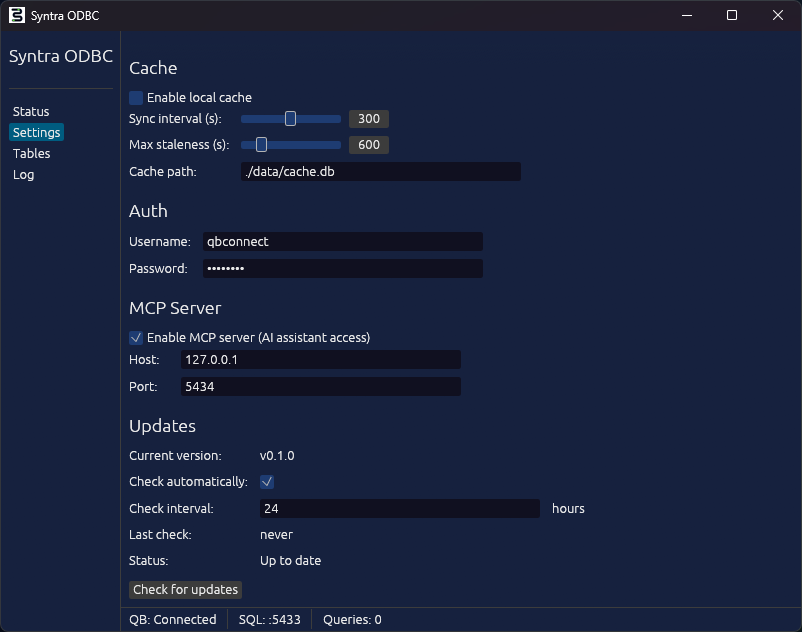
Full reference
Section titled “Full reference”The block below shows every section Syntra understands, with the defaults. Omit a section to keep its defaults; Syntra fills them in at load time.
# ---------------------------------------------------------------------------# QuickBooks Desktop integration# ---------------------------------------------------------------------------[quickbooks]# Path to a specific .qbw file. Leave empty (or omit) to attach to whichever# file QuickBooks currently has open.# company_file = "C:\\Users\\Public\\Documents\\Intuit\\QuickBooks\\Sample Company.qbw"
# Directory that holds the .qbw file and its .DSN sidecar. Used by the# live-reads path to find the DSN.# data_directory = "C:\\Users\\Public\\Documents\\Intuit\\QuickBooks"
[quickbooks.recovery]# When true, Syntra tries to bring QuickBooks back online after a detected# crash. Requires quickbooks.company_file so the relaunch is deterministic.enabled = false# username = "Admin"# password = "changeme"
# ---------------------------------------------------------------------------# SQL server (the port clients connect to)# ---------------------------------------------------------------------------[server]host = "127.0.0.1"           # set to "0.0.0.0" to accept non-local clientsport = 5433max_connections = 20
# Optional TLS. When both are set, Syntra accepts encrypted sessions.# Clients must pass SSLMode=require (or higher) to force encryption.# tls_cert = "C:\\ProgramData\\SyntraODBC\\certs\\server.crt"# tls_key  = "C:\\ProgramData\\SyntraODBC\\certs\\server.key"
# ---------------------------------------------------------------------------# Auth (required — these credentials authenticate every client connection)# ---------------------------------------------------------------------------[auth]username = "qbconnect"password = "changeme"         # CHANGE THIS in production
# ---------------------------------------------------------------------------# Local cache (how Syntra serves fast reads)# ---------------------------------------------------------------------------[cache]path = "data/cache.db"             # relative paths resolve under %PROGRAMDATA%\SyntraODBC\enabled = trueeager_load = false                 # true = pre-warm the cache on startupsync_interval_seconds = 300        # baseline full-sync cadencestale_threshold_seconds = 600      # hard cutoff where the cache is considered staledefault_max_staleness = 600        # default allowed staleness for reads (seconds)
[cache.sync_intervals]# Adaptive polling — per-tier sync cadence.hot    = 60      # transactions (invoices, bills, POs)warm   = 180     # master data (customers, vendors, items)cold   = 900     # reference data (classes, terms, payment methods)frozen = 3600    # singletons (host, company, preferences)
# ---------------------------------------------------------------------------# Logging# ---------------------------------------------------------------------------[logging]level = "info"                     # trace | debug | info | warn | errorfile  = "logs/syntra-odbc.log"     # unset to disable file logging
# ---------------------------------------------------------------------------# Live reads (QuickBooks Enterprise only)# ---------------------------------------------------------------------------# Older configs used [sqlanywhere] or [sql_anywhere]; both aliases still load# for backward compatibility, but the current section name is [odbc].[odbc]mode     = "auto"   # auto | enabled | disabledusername = ""       # only needed if the company file is password-protectedpassword = ""
# ---------------------------------------------------------------------------# MCP server (for AI-assistant integrations — Claude Code, Cursor, etc.)# ---------------------------------------------------------------------------[mcp]enabled = truehost    = "127.0.0.1"port    = 5434
# ---------------------------------------------------------------------------# Persistent memory layer (learned vendor aliases, facts, reconciliation state)# ---------------------------------------------------------------------------[memory]enabled = truepath    = "data/syntra-memory.db"
# ---------------------------------------------------------------------------# Auto-updater# ---------------------------------------------------------------------------[updater]auto_check           = truecheck_interval_hours = 24# skip_version = "0.2.0"          # pin a version you don't want to be prompted about
# ---------------------------------------------------------------------------# License (written by the app during activation — usually not edited manually)# ---------------------------------------------------------------------------[license]# Managed by the app's Activation tab.
Section quick reference
Section titled “Section quick reference”| Section | Purpose |
|---|---|
[quickbooks] | Which company file to attach to and where to find its .DSN sidecar. |
[quickbooks.recovery] | Optional unattended restart of QB after a detected crash. |
[server] | TCP host/port/max-connections for client connections. Also where TLS lives. |
[auth] | Username/password clients must present on every connection. |
[cache] | Local-cache file path, sync cadence, staleness thresholds. |
[cache.sync_intervals] | Per-tier adaptive polling cadence (hot / warm / cold / frozen). |
[logging] | Log level and log file destination. |
[odbc] | Live-reads mode for QB Enterprise (auto / enabled / disabled). Old aliases [sqlanywhere] / [sql_anywhere] still accepted. |
[mcp] | MCP server for AI-tool integrations. HTTP/SSE transport when enabled. |
[memory] | Separate DuckDB file for the learning layer (survives cache rebuilds). |
[updater] | Auto-update poll cadence. |
[license] | Activation state. Managed by the app. |
Per-session SQL overrides
Section titled “Per-session SQL overrides”A few runtime settings can be changed per connection without touching config.toml:
-- Force live reads for this session (bypass the cache for every query)SET QB_MAX_STALENESS = 0;
-- Allow up to 5 minutes of stalenessSET QB_MAX_STALENESS = 300;
-- Fall back to the value from [cache].default_max_stalenessRESET QB_MAX_STALENESS;
These apply to the current connection only and disappear when the connection closes.
Where Syntra looks for config.toml
Section titled “Where Syntra looks for config.toml”Checked in order; the first one that exists wins:
./config.toml— a dev override in Syntra’s current working directory.%PROGRAMDATA%\SyntraODBC\config.toml— the production path.- The installed-alongside fallback next to
syntra-odbc.exe.
The Settings tab in the app always edits the file Syntra actually loaded, so there’s no ambiguity about which config is live.