Trial and License Activation
Syntra ODBC runs in one of three states: trial, licensed, or unlicensed. The first time you launch the app you pick between starting a free trial or entering a license key. After that, everything license-related lives on the License tab in the left sidebar.
First Launch: Welcome Dialog
Section titled “First Launch: Welcome Dialog”After you install Syntra ODBC and launch it for the first time, the welcome dialog opens on top of the Status view:
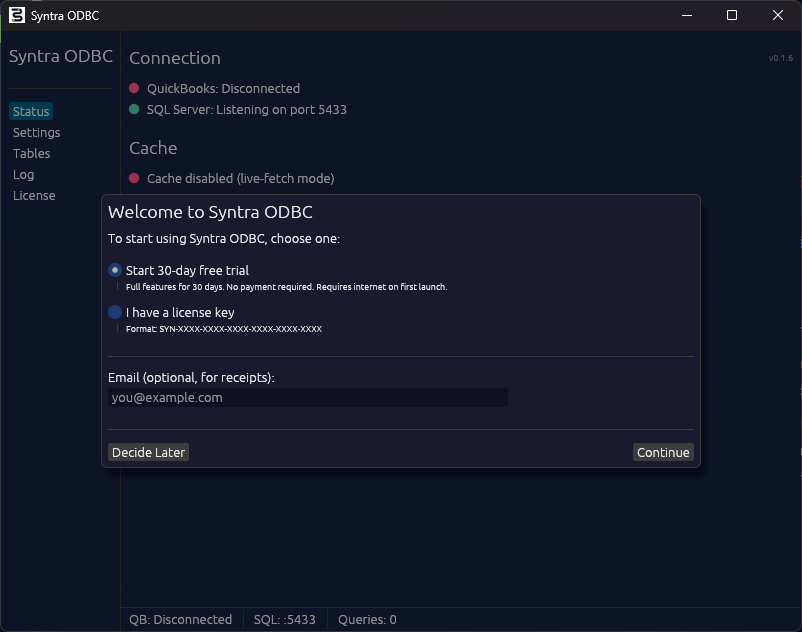
Pick one of the two options and click Continue:
- Start 30-day free trial — all features unlocked for 30 days. No payment required. Your machine needs internet access on first launch so the trial can be registered with the licensing server. After that, the driver works offline and only checks in periodically.
- I have a license key — paste a key you received by email after purchase. Keys use the format
SYN-XXXX-XXXX-XXXX-XXXX-XXXX-XXXX.
The Email (optional, for receipts) field attaches your email to the trial registration so we can email you a receipt if you later buy a license, and so support can look up your installation by email. Leave it blank if you prefer not to share it.
Decide Later closes the dialog without starting anything. Syntra ODBC will not accept connections until you come back to the License tab and pick one of the two options.
Starting a Trial
Section titled “Starting a Trial”Choose Start 30-day free trial and click Continue. The app contacts the licensing server, registers your installation, and drops you onto the Status view with all features enabled. The trial covers:
- ODBC reads and writes
- Network SQL (TCP port 5433)
- MCP server
- Windows Service mode
- Unlimited QuickBooks company files
You can confirm the trial is active by clicking License in the left sidebar. You should see Status: Trial - 30 days remaining (counting down each day).
When the Trial Expires
Section titled “When the Trial Expires”At the end of day 30 the server stops accepting new SQL connections. Your cache, settings, and schema configuration are preserved. To keep working you have two options:
- Buy a license and activate the key (see below). Any data the cache already holds is still there.
- Start a fresh trial on a different machine, if you are evaluating for a team. Each machine can only have one trial.
Buying a License
Section titled “Buying a License”- Open the License tab and click Buy Standard ($299/yr) or Buy Pro ($499/yr), or visit the pricing page directly. Use these buttons only when you do not already have a paid subscription. If you already have a Standard license and want to move to Pro, see Changing Plans below.
- Complete checkout through Paddle, our merchant of record.
- A license key arrives at the email you used on the order. Subject line is “Your Syntra ODBC license key”. Check spam if it does not appear within a minute or two.
Standard covers a single QuickBooks company file and the core ODBC driver. Pro removes the company-file limit and adds the MCP server, Windows Service mode, Terminal Server / RDS support, and live reads on QuickBooks Enterprise. See the pricing page for the full feature comparison.
Activating Your License
Section titled “Activating Your License”Open Syntra ODBC and click License in the left sidebar. You will see the License tab:
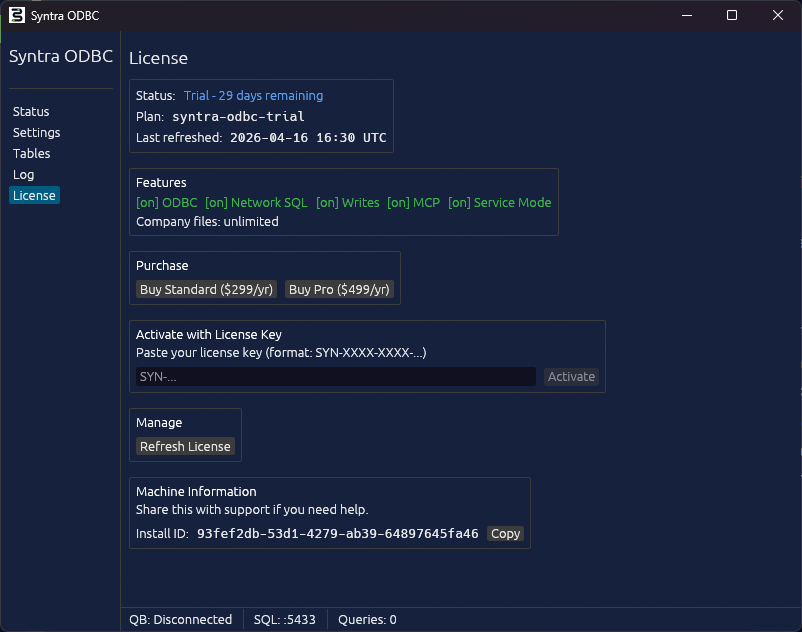
Then:
- Paste your license key into the Activate with License Key field. The format is
SYN-XXXX-XXXX-XXXX-XXXX-XXXX-XXXX, six groups of four characters separated by dashes. Spaces are ignored. - Click Activate.
The app contacts the licensing server, validates the key, and binds the key to this machine. On success the Status line switches from Trial to your plan (syntra-odbc-standard-annual or syntra-odbc-pro-annual) and the features row updates to match what your plan includes.
Activation needs internet. After activation, the driver works offline and reconnects to the licensing server periodically to confirm the subscription is still current.
If Activation Fails
Section titled “If Activation Fails”Common causes:
- Key format invalid — check that the key starts with
SYN-and has six groups of four characters after it. Re-paste from the original receipt email. - Key already activated on a different machine — each key is bound to one installation. If you are moving to a new computer, email [email protected] with the Install ID from the Machine Information panel and we will release the old activation.
- No internet on first activation — connect to the internet and click Activate again.
- Subscription cancelled or refunded — the key is revoked server-side. Reinstate the subscription from your Paddle receipt or purchase a new license.
Refreshing a License
Section titled “Refreshing a License”The Refresh License button in the Manage section forces an immediate license check against the server. Use it after:
- Entering a new license key, for example after a plan change (see Changing Plans below)
- Fixing a payment failure that had pushed the license into grace mode
- Any time the features row looks out of sync with what you expect
The driver refreshes automatically on a schedule, so you rarely need this button in normal operation.
Machine Information and Support
Section titled “Machine Information and Support”The Machine Information panel shows the Install ID, a UUID that uniquely identifies this installation. Copy it with the Copy button and include it in any support request. It lets us look up your installation, license history, recent errors, and whether the webhook handshake with the payment provider succeeded, without us needing to ask for the license key itself.
Managing Your Subscription
Section titled “Managing Your Subscription”Use the Paddle customer portal to update payment details, download invoices, or cancel. A link to the portal is included at the bottom of every Paddle receipt and renewal email. Cancelling stops future billing but leaves your current paid term active until it expires. For refund eligibility see the Refund Policy. To change plans see Changing Plans below.
Changing Plans
Section titled “Changing Plans”Plan changes (Standard to Pro, Pro to Standard) are handled manually. Email [email protected] from the address on your order and include your Install ID from the License tab’s Machine Information panel. We will confirm the change, prorate the difference against your current term, and send you a new license key for the new plan.
Once you have the new key:
- Open the License tab in Syntra ODBC.
- Paste the new key into the Activate with License Key field and click Activate.
- Click Refresh License. The features row updates to match the new plan.
Your old key is released automatically when the new key binds to this installation.